Your orders appear in the dealer panel your Smart Rafiki contact set up for you. There is no self sign-up — if you do not have access, ask them.
What is settled before you see it
The customer's credit is decided before they reach you
By the time an order appears, the customer's limit has been approved, their agreement signed and their deposit taken. You are never asked to assess anyone, and you never see their financial details.
You are paid by Rafiki, not by the customer
The customer's instalments are between them and Smart Rafiki. Your settlement comes from us on the terms in your dealer agreement, and does not depend on whether the customer keeps up their payments.
Payment terms, payout destination and commission are configured against your account rather than being the same for everyone. If what you see does not match what you agreed, that is a configuration question for your Rafiki contact — not a dispute about a particular order.
An order, end to end
Four states, in this order. The order moves forward only when you move it, and the panel shows which one you are in at the top right of the Financed order panel.
1 · Preparing order — set it aside
A new credit order opens here. The panel shows you the gross amount, the commission and what you receive, and asks for one thing: a Ready by date and time. That is your estimate of when the customer can collect.
Press Confirm — set aside and the unit is reserved against this order.
There is no picture of this first state yet. The order this guide was written from had already moved past it, and reaching it again means a customer paying for a new order.
The second button, I don't have this unit, is the right answer when the unit is gone or was never in stock. You pick a reason — sold after listing, never had it, have it but cannot sell this one, not that model, not at that price, or something else — and that ends the order cleanly.
Do this rather than leaving the order sitting. A customer has already paid a deposit and is waiting on a date you gave them.
2 · Ready to release — the three checks
When the unit is set aside, three checkboxes appear. The Record handover button stays greyed out until all three are ticked.
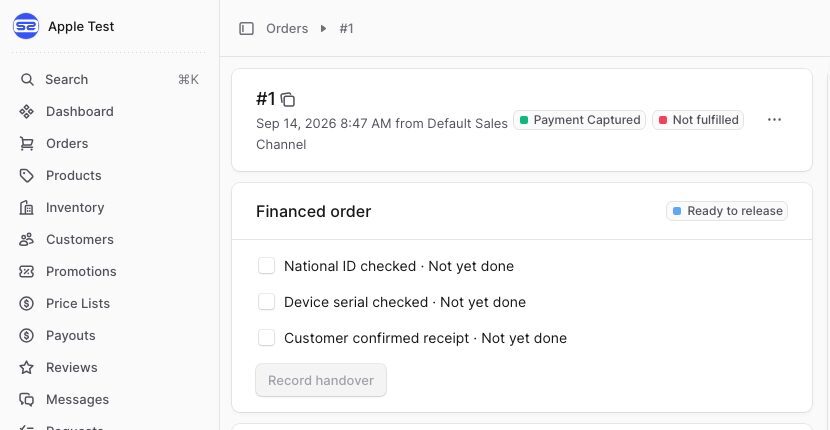
| Check | What it means in the shop |
|---|---|
| National ID checked | The person collecting has shown you their National ID. The customer is told to bring it. |
| Device serial checked | You have the actual box in your hand and have read the serial off it. |
| Customer confirmed receipt | The customer has the device and is satisfied with it. |
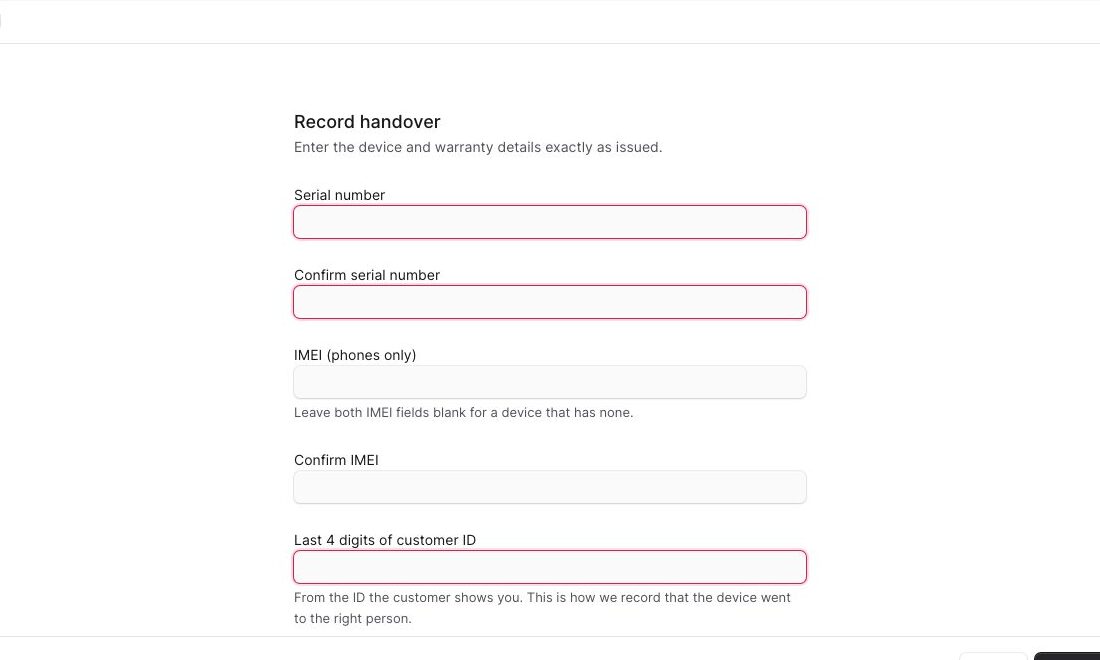
3 · Record handover — the device details
The form asks for the serial number twice, the IMEI twice, and the last four digits of the customer's ID.
4 · Handed over — and the plan goes live
The panel confirms the handover with a date and time. That timestamp is the record.
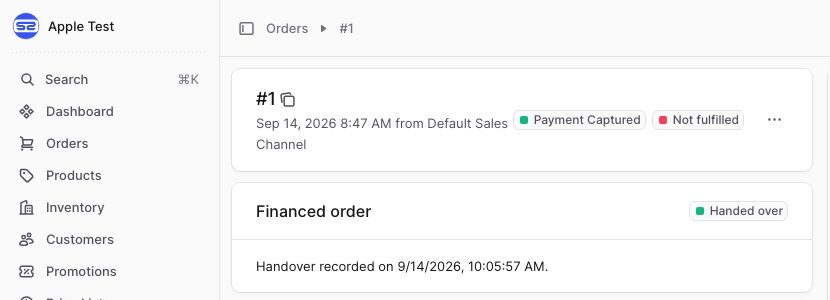
The customer's credit agreement is activated by this step, not by the order being placed. Until you record the handover, the plan is not live and their repayment schedule has not started. Handing the device over first means a device has left your shop against an agreement that is not yet running.
Two rules that are not obvious
Type the serial twice, do not paste it twice
The second field exists to catch a typo in the first. Copying your own mistake into both fields gets past the check and puts the wrong device on the agreement. The serial is what ties a specific device to a specific credit agreement — it is what gets used for warranty claims, for disputes, and where it applies, for device locking.
The last four ID digits are how we record who collected
Take them from the ID the customer shows you, not from anything they read out to you. This is the only record that the device went to the right person.
Not verified — ask before relying on it
The four steps above have been run end to end on the real system. These have not, and this page will say so until they have.
| Area | Status |
|---|---|
| Settlement run and payout timing | Built, never run end to end |
| Stock checking against your daily list | Built, unproven |
| Returns and cancellations after handover | No documented process |
| What happens if you reject an order after setting it aside | Not walked |
If something goes wrong
Contact your Rafiki Operations contact, with the order reference and the serial or IMEI if a device has been handed over. Those two identifiers are what let anyone at our end find the same transaction you are looking at.
Take a repayment from a customer on our behalf, quote them a balance, or discuss their credit status. You will not have the right figures and the customer will act on them. Send them to Smart Rafiki.